Every batch, weighed.
The bin says when the feed does not stop.
A weigh bin fills, weighs and discharges, hundreds of times a shift. Logable watches the weight and the totalisers, and raises an alert when a bin passes its capacity or stops emptying.
- Every batch
- weight and the running totals
- Overfill
- an alert at the rated capacity
- A stuck discharge
- two hours full is its own alert
The bin is full, and the feed is still running.
Gypsum Weigh Bin reaches 5.2 t against a 5 t capacity because the feed did not stop. The load cell takes the load, and nobody is watching the hopper.
- Overfill is an alertThe bin passes the capacity you set, and somebody stops the feed.
- A stuck discharge shows upA bin that sits near full for two hours is not cycling, and that is a separate alert.
- Batch counts, without a clipboardThe totalisers say how many batches ran and what they weighed.
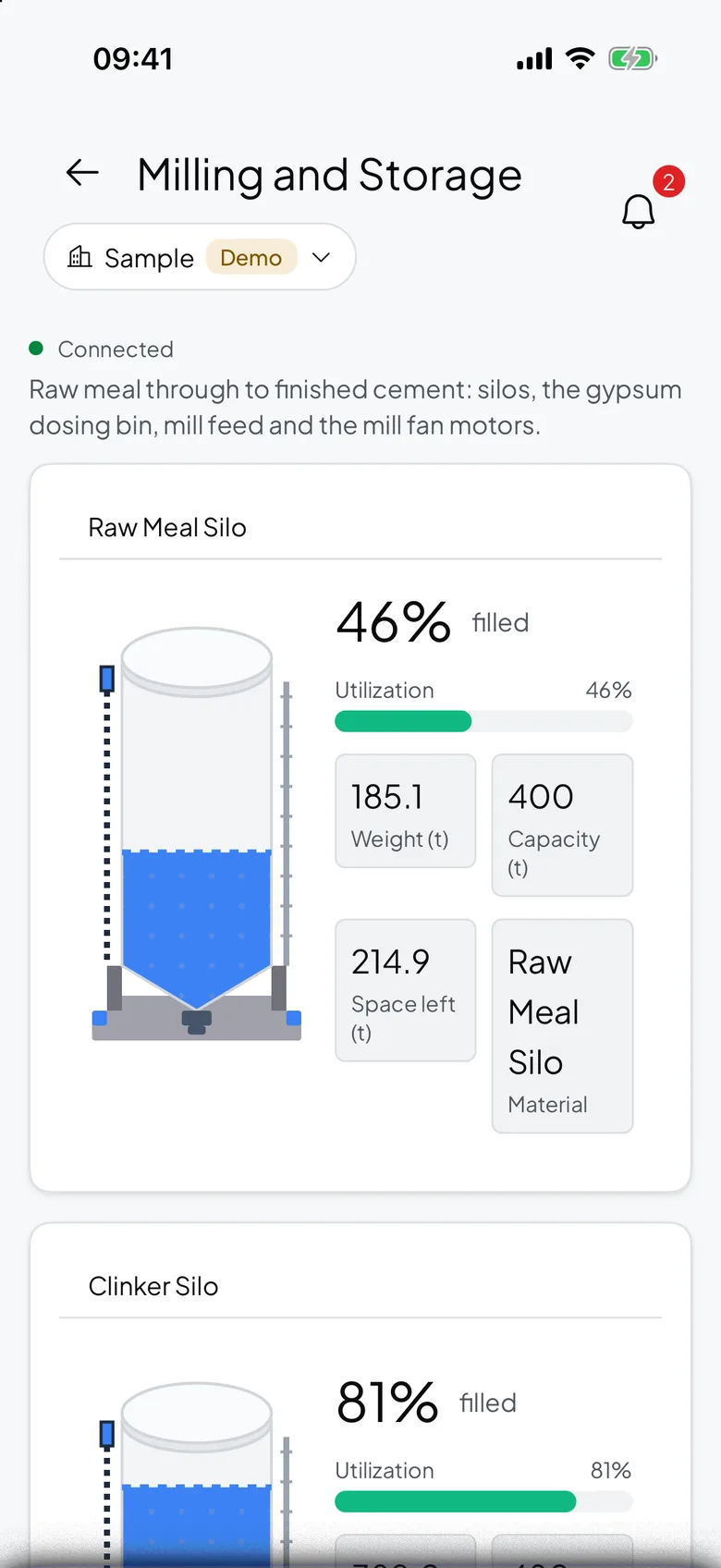
The bin, and what feeds it
A batch weight means more with the silo above it and the scale after it on the same board.
A bin that does not empty says so itself.
Live batch weight, the discharge gate and the two running totals.
The silo above the bin books its own delivery.
Stock on hand in the vessel that feeds the bin, against its capacity.
A check weight lands beside the batch it belongs to.
Gross weight from a platform scale or a weighbridge indicator.
What to collect from a weigh bin
One weight, one gate state and the totals. That is enough to see every cycle and every cycle that did not happen.
| Reading | Unit | What it tells you | Where it comes from |
|---|---|---|---|
| Batch weight | t | what is in the bin right now, against its rated capacity | the load cells under the hopper |
| Discharge gate | open or closed | whether the bin is discharging or holding | the gate's own limit switch |
| Feed silo weight | t | whether the vessel above the bin can keep feeding it | load cells under the silo legs |
From the hopper load cells to the phone
The load cells under the hopper feed the batching indicator, which already holds the weight and the totals. A gateway polls it and publishes to Logable.
- Hopper load cellsUnder the bin
- Modbus TCP
- GatewayPolls · Publishes
- MQTT, encrypted
- Logable CloudRules · Totals
- Push · Email
- PhonePush · 5.2 t
One Logable device is one bin. A batching plant with four bins publishes to four device topics, so each bin keeps its own cycle history.
The gateway between the indicator and Logable
| Protocol | How it reaches Logable | Notes |
|---|---|---|
| MQTT | Direct to Logable | The gateway publishes to Logable over MQTT with TLS, on port 8883. |
| HTTPS | Direct to Logable | A gateway or a logger can post the same reading to the Logable API instead. |
| Modbus TCP | Through a gateway | The batching indicator's Ethernet output is polled by the gateway, never by Logable. |
| Modbus RTU | Through a gateway | An RS-485 indicator is polled by the same gateway. Logable stays above it. |
Batching indicators expose the live weight and the totalisers over Modbus. A gateway polls those registers, names the values, and publishes them as JSON. Nothing on the batching PLC changes, and nothing is written back to it. See how to connect a PLC or a Modbus device via a gateway.
Every bin, and every cycle
Live batch weight per bin, the gate state, and the totals the shift has run.
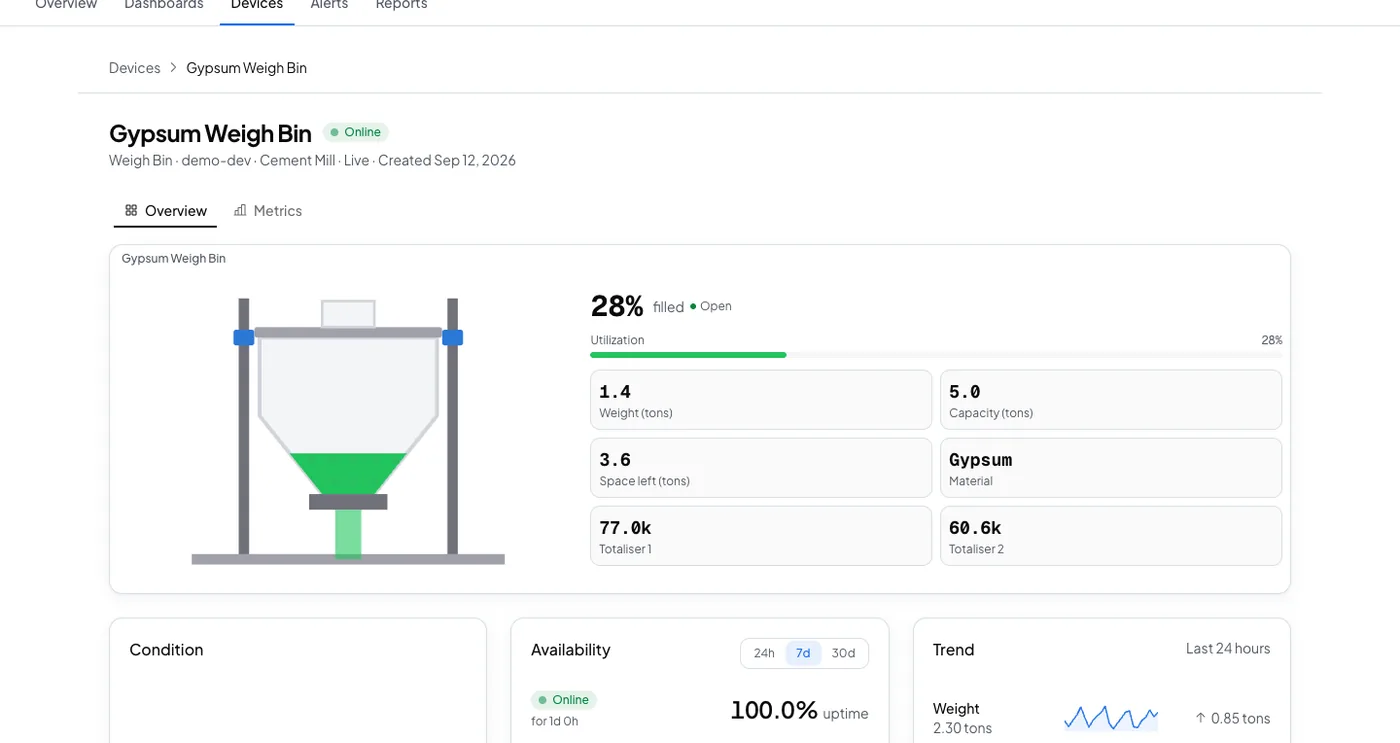
A bin that does not empty says so.
The load cells and the totalisers are already there. Logable watches the cycle and raises the alert when one stops.
The alerts a weigh bin is worth having
Three presets cover the feed that did not stop, the discharge that stuck, and the bin that went quiet.
- Loaded past capacity
Tells you when the bin’s weight reaches its rated capacity, which usually means the feed did not stop.
- Full and not emptied
Tells you when the bin stays near full for two hours without being emptied.
- Not reporting
Tells you when this device stops sending data, and again when it comes back.
The bin passes its capacity. The phone says which one.
Gypsum Weigh Bin reaches its rated capacity, and the push names the bin and the weight, so the feed is stopped before the mounts take the load.
- The bin, not just a pingThe push names the bin and the weight in it.
- Acknowledge onceThe reminders stop, and the next person is told if nobody acts.
- The stuck discharge is separateTwo hours near full is its own alert, because it is a different problem.
What goes wrong, and what changes
Three failures on a batching line, and the preset for each.
| What happens | What you see today | What Logable does |
|---|---|---|
| The feed does not stop at the set point. | The bin overfills and the load cells carry more than they should. | The alert fires at the rated capacity you set for the bin.Loaded past capacity |
| The discharge sticks and the bin stops cycling. | The line runs short and nobody knows which bin is holding. | A bin near full for two hours raises its own alert.Full and not emptied |
| The indicator loses its link. | The last batch weight sits on the screen and looks current. | The not reporting alert names the bin that went quiet.Not reporting |
What it costs to watch six bins
Sized by how many devices report, not by how many batches they run.
The trial runs 14 days with 5 devices and Growth features, and asks for no card. Industry plans are quoted per site.
The gateway is bought once from your supplier and is not a Logable cost. The load cells and the batching indicator stay as they are.
Frequently asked questions
What teams ask before they connect the first device.
Add the bin as a weigh bin device and set its rated capacity. The Loaded past capacity preset fires the moment weight reaches that capacity and clears once it drops back under 90 percent of it. The push names the bin and the weight.
Yes. A weigh bin carries two totalisers, which the batching indicator already keeps. Logable stores them alongside the live weight, so the batch count and the total weight for a shift are on the same board as the bin.
The Full and not emptied preset fires when the bin sits at 80 percent or more of its capacity for two hours straight, and clears only once it drops back to half full. That is what an actual discharge looks like, rather than a brief dip.
No. The batching indicator wired to the existing load cells almost always exposes the weight and the totalisers over Modbus. A gateway reads that output. Nothing is rewired and nothing is recalibrated.
Also for silos, belts and PLC values
Silo Monitoring
Live silo weight from the load cells you already have.
Learn moreBelt Scale Monitoring
Rate, belt speed and totalised tonnes on one dashboard.
Learn morePLC Monitoring
Connect PLCs to cloud dashboards via gateways.
Learn moreRunning a batching line like this? monitoring for manufacturing or read how to monitor a vessel remotely.
Put the first bin on a dashboard
Connect the batching indicator through a gateway and set the bin's rated capacity.