Know before a problem
becomes downtime.
When a silo runs low, a pump runs hot or a machine stops reporting, the person on shift gets the reading on their phone. Once, not fifty times. If nobody acts, the next person is told.
- On the phone
- and by email and in the inbox
- Once, not fifty
- a reminder only if it lingers
- The next person
- is told if nobody acts
Triggers
| Severity | Alert | Value | Fired | |
|---|---|---|---|---|
| critical | Clinker silo running low12% filled, below the 15% limit | 12% filled, below the 15% limit | 2 min ago | Resolve |
| critical | Transfer pump pressure high5.76 bar, above the 5.4 bar limit | 5.76 bar, above the 5.4 bar limit | 8 min ago | Resolve |
| warning | Crusher motor running hot88 °C, above the 85 °C limit | 88 °C, above the 85 °C limit | 14 min ago | Resolve |
| warning | Weighbridge offlineNo data for 41 min | No data for 41 min | 41 min ago | Resolve |
| info | Process water tank low38% filled, below the 40% limit | 38% filled, below the 40% limit | 1 h ago | Resolve |
If nobody acts, the next person is told.
Transfer Pump 1 reads 5.76 bar at 02:10. The limit is 5.4 bar. The operator on shift gets the alert. If it is not acknowledged in 15 minutes, the supervisor gets it too.
- You hear about it onceThe alert fires when the reading crosses the limit, not on every reading after it.
- Then the next personYou choose who is told after 15 minutes, then after 30. By role, so it still works when someone leaves.
- Whoever takes it, owns itAcknowledge the alert and nobody else is paged.
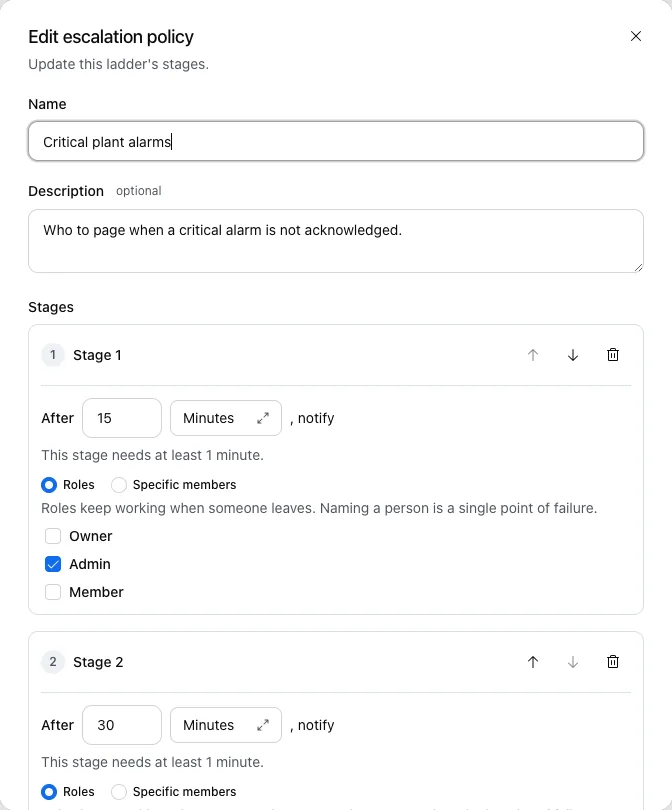
One alert per problem. Not one per reading.
You are told when it starts and when it is back to normal. Nothing in between, unless you ask for a reminder.
Know when there is a problem
Set a limit on any reading, or add the ready-made alerts and change a limit later.
A reading crosses a limit
A silo drops below a level, a pump climbs past its pressure limit, a motor runs too hot. For example, pressure above 5.4 bar.
A machine stops reporting
A device goes quiet, drops offline or comes back. You hear about both. For example, Dispatch Weighbridge offline.
A reading changes too fast
A sudden rise or drop over minutes or hours, before it reaches a limit. For example, temperature up 15% in 5 min.
Something arrives
A delivery is logged, a batch is weighed, a truck crosses the weighbridge. For example, Dispatch Log: new event.
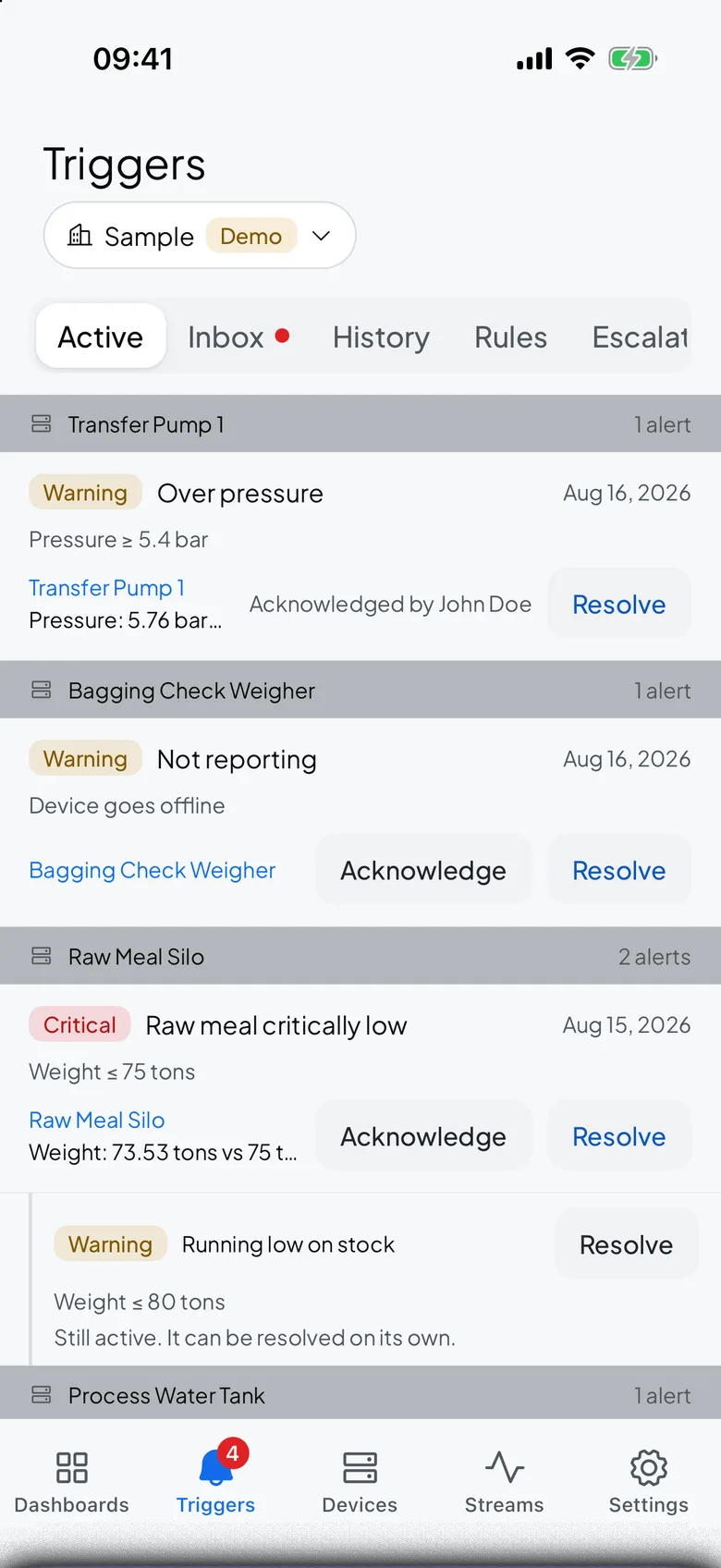
The alert reaches the phone.
Raw Meal Silo drops to 73.5 t against a 75 t limit. The night shift gets the push with the reading, and the morning shift finds it in the inbox.
- Push with the exact readingDevice, metric and value, the moment a rule fires. Tap it to open the device.
- An inbox that keeps themEvery alert stays in the inbox until someone resolves it, on the web and in the app.
- Quiet hoursOnly critical alerts reach the phone during quiet hours. Email and the inbox always arrive.
Alerts that are already set up
Every device type comes with its alerts. Add them to one machine or to all of them, then change a limit if your plant runs differently.
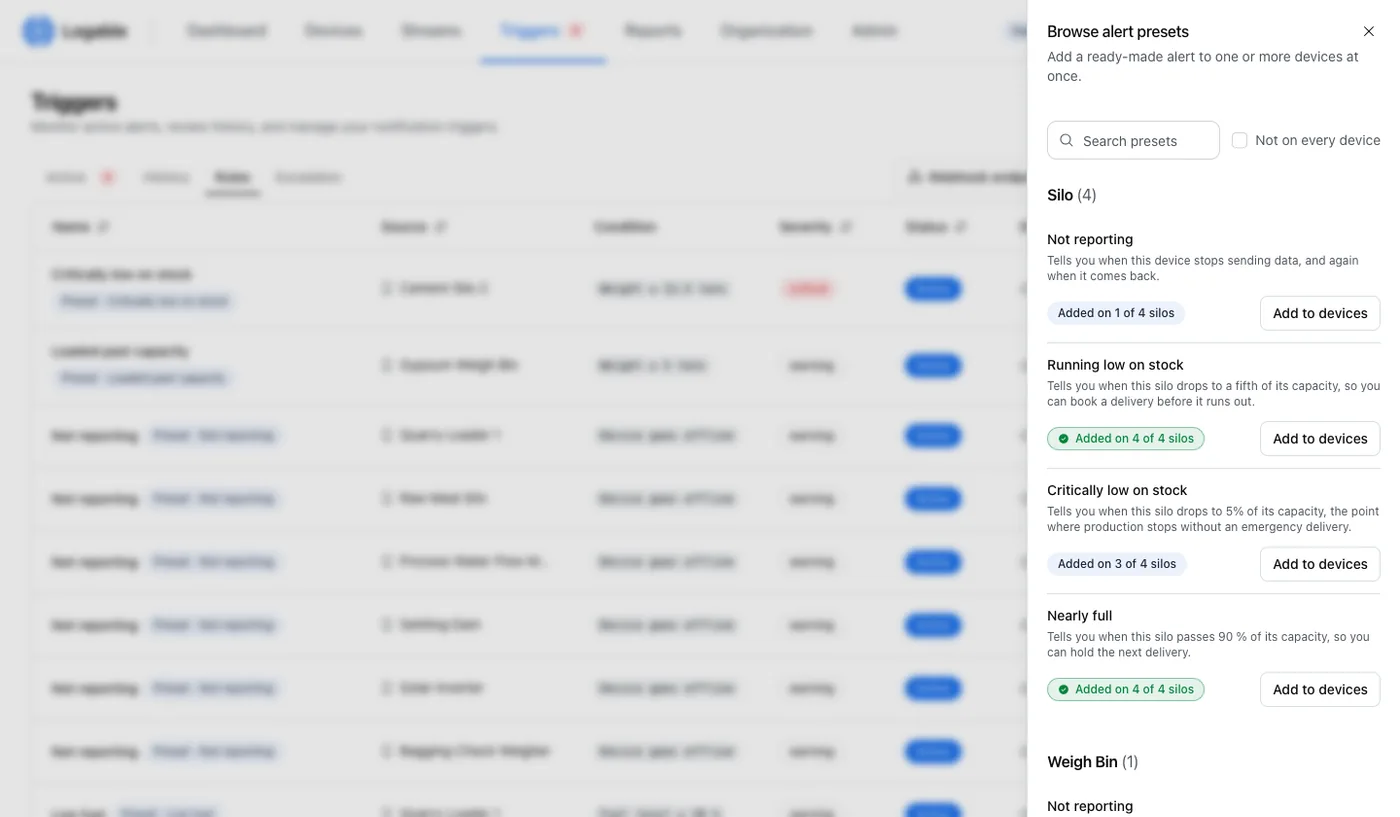
- Four alerts per silo
- Not reporting, running low, critically low, nearly full.
- Added on 4 of 4 silos
- One click adds the alert to every device of that type.
- Your limits
- Edit the limit on any device. The preset stays attached.
Set the first rule before the next night shift
Add a preset to one device now. The alert reaches the phone tonight.