The dam level, live.
Known before the pumps run dry.
A sensor on the wall measures the surface. Logable turns that into a level and a stored volume, and tells somebody when the dam drops under the level you work to.
- Level and volume
- from the shape and capacity you set
- Four readings
- agree before the alert fires
- Solar and 4G
- one outbound link from the wall

Nobody drives to the dam wall on a Sunday.
Settling Dam drops to 23 percent over a dry week. The pumps keep drawing, and the first sign is a pump running on air.
- Level and stored volumeThe percentage, and what it means in volume from the shape and capacity you set.
- One alert, not fiftyFour agreeing readings in each direction, because a dam sensor is a noisy instrument.
- No power at the wallSolar and a 4G router carry the outbound link from a site with no mains.
The dam, the pump and the meter
A falling level is either use or loss. The pump and the meter say which.
A dam under its working level says so before the pumps do.
Level as a percentage of full supply, and the raw distance the sensor reads.
The pump drawing from the dam is watched beside it.
Flow and discharge pressure on the pump that takes water out.
What was drawn, as a number rather than an estimate.
Instantaneous flow and the total volume off the dam.
What to collect from a dam
The level is the answer. The raw distance is how you check the answer when a reading looks wrong.
| Reading | Unit | What it tells you | Where it comes from |
|---|---|---|---|
| Dam level | % | how much is left against full supply level | the ultrasonic sensor on the dam wall |
| Surface distance | m | the raw reading behind the level, for checking the instrument | the same sensor, before the conversion |
| Draw flow rate | L/min | how fast water is leaving the dam | the pump on the draw line |
From the wall to the farmhouse
A sensor on the wall reads the surface and a 4G router carries it out. There is no site network and no cable back to a building.
- Level sensorOn the wall
- 4-20 mA · Modbus RTU
- 4G routerSolar · Outbound only
- MQTT, encrypted
- Logable CloudRules · Volume
- Push · Email
- PhonePush · 23 %
Logable stores dam level as a percentage of full supply level, and works the stored volume out from the shape and the capacity you set on the device. Nothing about the dam's geometry is guessed at reading time.
Power and signal at the wall
| Protocol | How it reaches Logable | Notes |
|---|---|---|
| MQTT | Direct to Logable | The router or the gateway publishes to Logable over MQTT with TLS, on port 8883. |
| HTTPS | Direct to Logable | A logger at the wall can post the same reading to the Logable API instead. |
| Modbus RTU | Through a gateway | An RS-485 level transmitter is read by the gateway at the wall, never by Logable. |
| Modbus TCP | Through a gateway | An Ethernet transmitter is polled by the same gateway. |
A dam wall rarely has mains power or a fixed line. A solar panel, a small battery and a 4G router cover both, and the link is outbound only, so no inbound port is opened anywhere. See how to connect a PLC or a Modbus device via a gateway.
The dam, and what draws from it
Level as a percentage of full supply, the stored volume, and the history behind both.
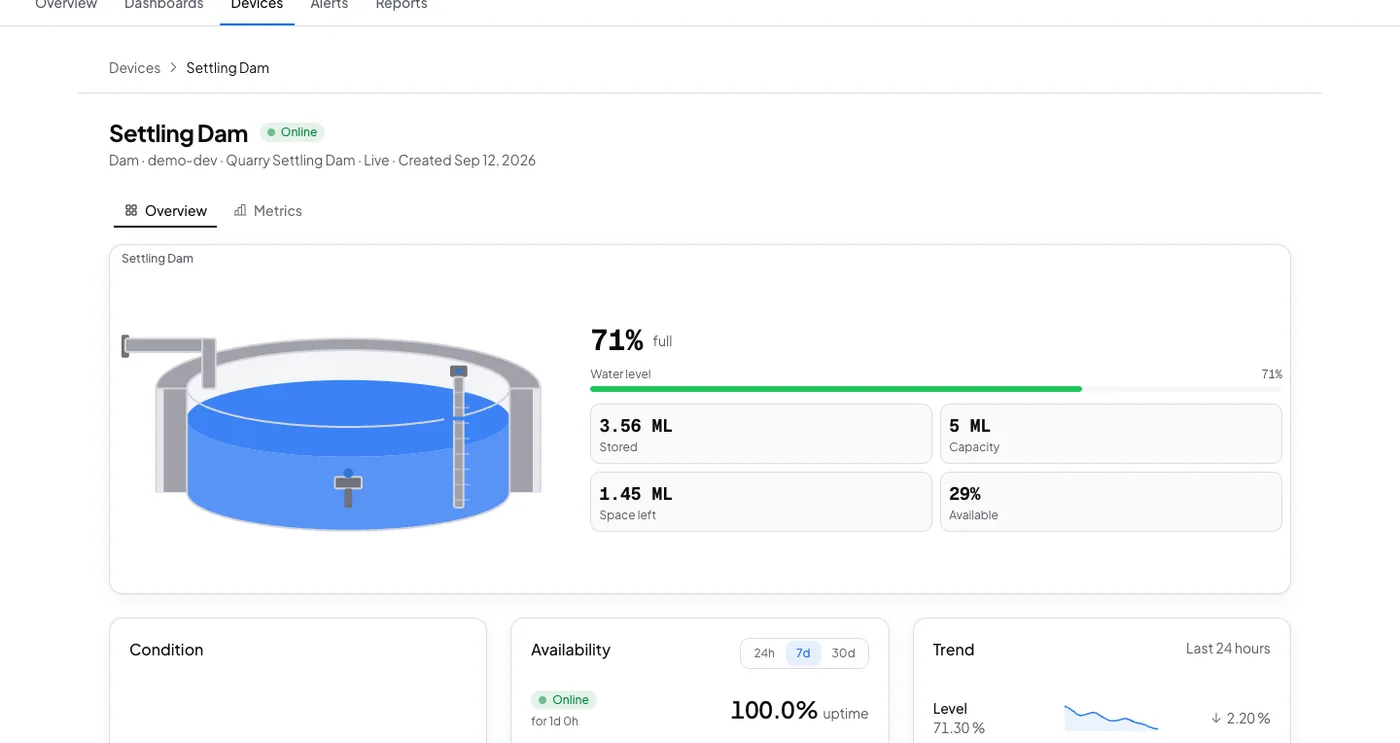
Four readings agree before the dam wakes anyone.
A dam sensor is the noisiest instrument on the platform, so its preset waits longer than any other before it fires or clears.
The alerts a dam is worth having
Three presets, and the dam one deliberately waits longer than any other on the platform.
- Low water level
Tells you when the dam drops to a quarter of its full supply level. This 25% threshold is a general default, not tailored to how your dam is normally run.
- Over pressure
Tells you when discharge pressure reaches 90 % of the pump’s rated maximum.
- Not reporting
Tells you when this device stops sending data, and again when it comes back.
The dam is an hour away. The level is in your pocket.
Settling Dam drops under a quarter of full supply level. The push names the dam and the level, so the decision about pumping is made the same day.
- The level, not just a pingThe push names the dam and the percentage, so nobody drives out to read a gauge.
- Acknowledge onceThe reminders stop, and the next person is told if nobody acts.
- The history, from the roadSee a week of level before you decide whether it can wait.
What goes wrong, and what changes
Three failures on a dam nobody visits daily.
| What happens | What you see today | What Logable does |
|---|---|---|
| The dam drops under the level the site works to. | It is found when a pump runs on air. | The low level alert fires at a quarter of full supply, after four agreeing readings.Low water level |
| The draw pump runs against a closed valve. | The seal fails before anyone drives out. | The over pressure alert carries the reading, so the trip is a fix.Over pressure |
| The solar supply fails at the wall. | The last level sits on the dashboard and looks current. | The not reporting alert names the dam that went quiet.Not reporting |
What it costs to watch four dams
Sized by how many devices report, not by how much water they hold.
The trial runs 14 days with 5 devices and Growth features, and asks for no card. Industry plans are quoted per site.
The sensor, the solar panel and the 4G router are bought once from your supplier and are not a Logable cost.
Frequently asked questions
What teams ask before they connect the first device.
A sensor on the wall reads the surface, and a gateway or a 4G router publishes the level to Logable over MQTT. Set the dam's shape and capacity on the device, and Logable shows level and stored volume together, with an alert at the level you work to.
Less steady than a tank or a silo, and Logable is built around that. Wind, surface movement and debris all move a single reading. The dam preset waits for four matching readings in each direction before it fires or clears, which is longer than any other preset on the platform, so one odd sample cannot raise a false alarm or a false all-clear.
Yes. Set the dam's shape and its full supply capacity on the device, and Logable works the stored volume out from the level. The percentage and the volume sit on the same widget.
Yes. A solar panel, a small battery and a 4G router carry the sensor and the outbound link. Logable does not supply that kit, and this page does not claim to: it is bought from a local supplier and installed once.
Also for tanks, pumps and boreholes
Water Tank Monitoring
Live level, and the alert before a tank runs dry.
Learn morePump Monitoring
Pressure, flow and power on every pump.
Learn moreBorehole Pump Monitoring
A pump on a farm nobody visits daily.
Learn moreWatching dams across a farm or a scheme? monitoring for water and utilities or read the dam device type reference.
Put the first dam on a dashboard
Connect the level sensor through a 4G router, set the shape and capacity, and add the preset.