See what your PLCs see.
From the office or the road.
A small gateway in the cabinet reads the values your PLCs already have and sends them to Logable. You see them on a dashboard and get an alert when one drifts. The PLC stays off the internet.
- No PLC changes
- values are read, never written
- Nothing opened up
- one outbound connection, encrypted
- Any Modbus PLC
- Siemens, Allen-Bradley and more

Works next to the SCADA, not instead of it.
Your SCADA stays where it is. The gateway reads the same values, and Logable shows them on a dashboard you can open from the office, from home or from the road.
- Nothing is written to the PLCThe gateway reads the values you choose. The PLC program does not change.
- No inbound portsThe gateway sends readings out over one encrypted connection. Nothing comes in.
- Alerts on any PLC valueThreshold, status and rate-of-change rules on every value the gateway reads.
| Time | temperature | power |
|---|---|---|
| 14:02 | 91.8 | 142.0 |
| 14:01 | 91.6 | 141.7 |
| 14:00 | 91.3 | 141.9 |
What you get with PLC monitoring
The dashboard, the alerts and the phone, on top of the PLCs you have.
A drive tells you before it trips.
Speed, power draw and winding temperature, read straight off the drive's registers.
A belt that slows tells you first.
Belt speed, throughput and a running total from the line PLC.
A batch that misses its target is caught on the shift, not on the invoice.
Batch weight, gate state and two totalisers, from the batching PLC.
What to read off the PLC
Pick the registers that matter on the gateway. Every one arrives named, with a unit, and is ready for a limit.
| Reading | Unit | What it tells you | Where it comes from |
|---|---|---|---|
| Winding temperature | °C | a drive heading for a trip | the PT100 wired into the PLC |
| Power draw | kW | a load climbing before anything jams | the drive's own Modbus register |
| Belt speed | m/s | a belt slowed or stopped | the tacho input on the PLC |
| Batch weight | kg | whether the batch hit its target | the load cells on the bin |
| Gate state | open or closed | a gate left open between batches | the limit switch on the discharge gate |
From the PLC to the phone
A gateway on your own network reads the PLC and sends each reading to Logable over one encrypted, outbound connection. Nothing reaches into the plant, and nothing is written back to the PLC.
- Line PLCValues · Logic
- Modbus TCP
- GatewayOn your network
- MQTT, encrypted
- Logable CloudRules · Alerts
- Live · Push
- PhonePush · Live
The gateway only reads the values you choose. Nothing is written to the PLC, and the program you already run does not change.
The gateway in the cabinet
| Protocol | How it reaches Logable | Notes |
|---|---|---|
| MQTT | Direct to Logable | The gateway publishes each reading to Logable over MQTT with TLS, outbound only. |
| HTTPS | Direct to Logable | A gateway that cannot publish MQTT can post the same readings to the Logable API. |
| Modbus TCP | Through a gateway | Read from the PLC by the gateway on your network. Logable never speaks Modbus itself. |
| Modbus RTU | Through a gateway | Serial PLCs and instruments on RS-485 are read by the same gateway. |
A gateway sits in the panel on your own network, polls the registers you choose, and publishes them upward over one encrypted connection. Nothing is written back to the PLC and no inbound port is opened. There are no servers to look after: nothing is installed on site except the gateway. See how to connect a PLC or a Modbus device via a gateway.
Works with any Modbus-capable PLC
If your PLC supports Modbus RTU or Modbus TCP, a gateway can read its values and send them to Logable.
If your brand is not shown and it supports Modbus, it very likely works. The gateway guide lists what to check before you order one.
Every line on one screen
Put several PLCs on one dashboard and compare lines, sites and shifts without walking to each panel.
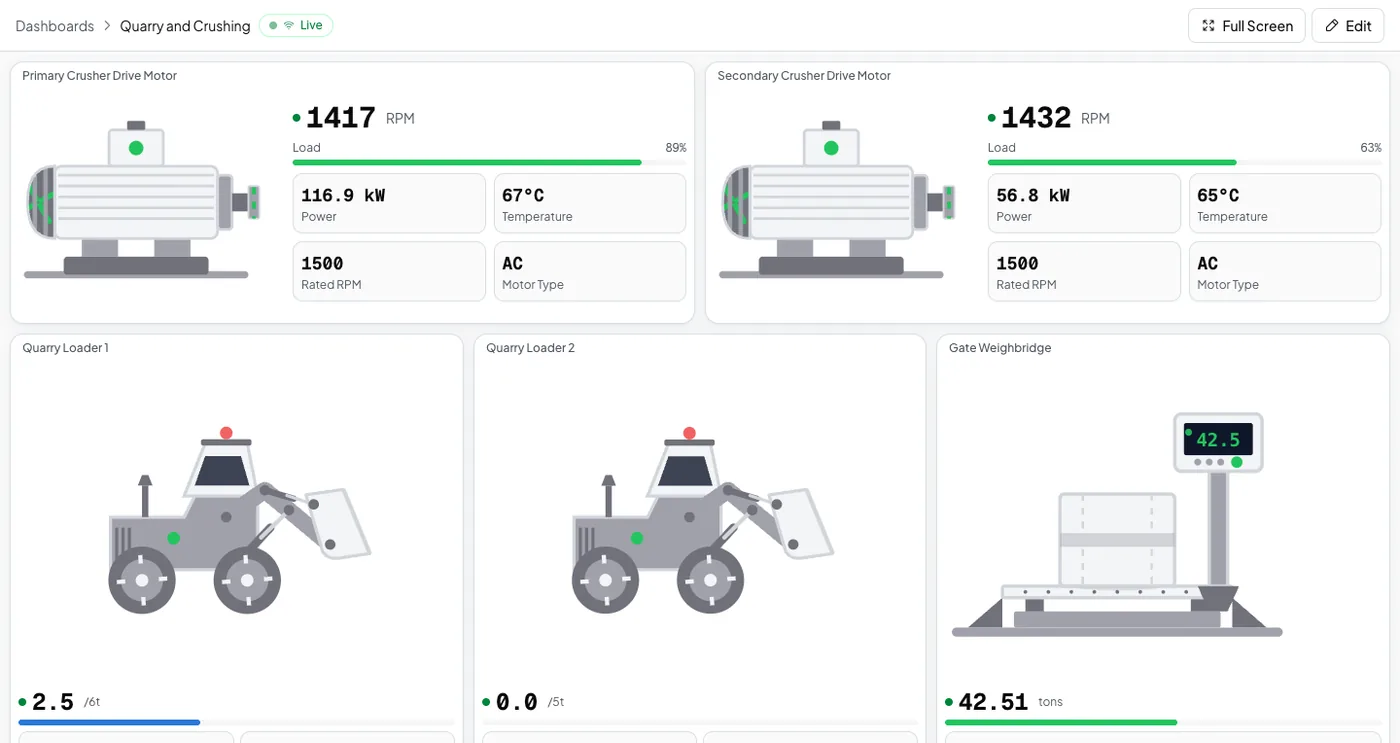
You already own the PLCs. You do not need to replace them to see what they do.
Logable adds the dashboard, the alerts and the phone on top of the control system you have.
A limit on any register
Four rules cover what a line PLC sees going wrong.
- Running hot
Tells you when the motor’s temperature passes 90 °C, well before insulation damage.
- Over maximum speed
Tells you when the motor exceeds the maximum RPM you set for it.
- Belt stopped
Tells you when the belt stops moving. Only add this to a belt that is meant to run continuously. It will also fire on planned stops.
- Not reporting
Tells you when this device stops sending data, and again when it comes back.
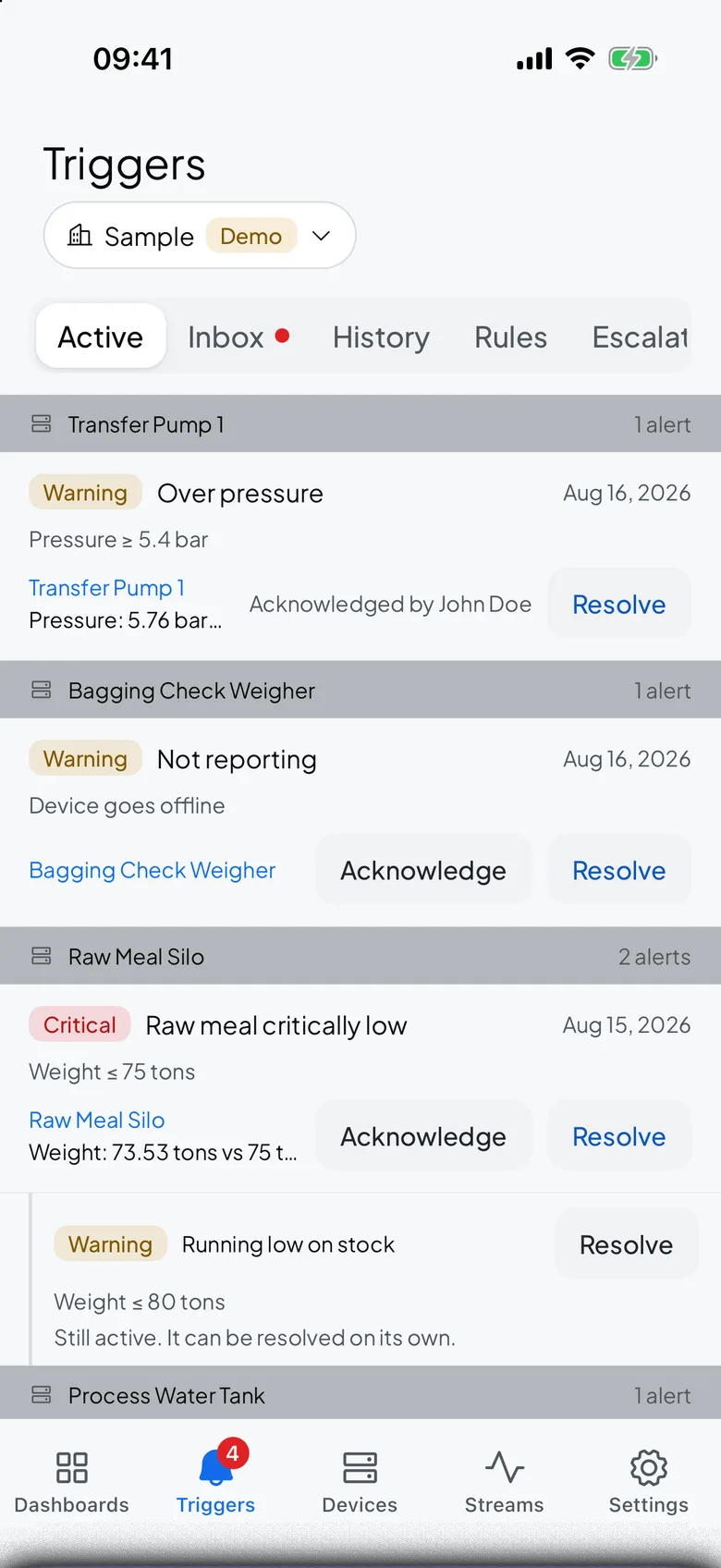
In your pocket, not just on the panel.
The Logable app shows the same dashboards and delivers the alert. Acknowledge and resolve from the floor, without walking back to the office.
- The same dashboardsEvery screen you built opens on the phone.
- Alerts on any PLC valueThreshold, status and rate-of-change rules on every value the gateway reads.
- No inbound portsThe gateway sends readings out over one encrypted connection. Nothing comes in.
What goes wrong on a line, and what changes
Three failures a panel light does not travel far enough to report.
| What happens | What you see today | What Logable does |
|---|---|---|
| A mill drive climbs past its temperature limit. | A panel lamp lights in a room nobody is standing in. | A phone alert carries the running-hot reading.Running hot |
| A belt stops mid-shift. | It is found at the next walk-round. | The stopped-belt alert fires the moment speed falls to zero.Belt stopped |
| The gateway drops its link. | The PLC keeps running and the dashboard quietly freezes. | The not-reporting alert names the device that went silent, and says when it returns.Not reporting |
On any screen, and before the line stops
Two more things PLC monitoring gives you, on top of the PLCs you already have.
What it costs
Sized by how many devices the gateway publishes, not by how many registers it reads.
The trial runs 14 days with 5 devices and Growth features, and asks for no card. Industry plans are quoted per site.
One gateway can serve several devices. The gateway itself is bought once from your supplier and is not a Logable cost.
Frequently asked questions
What teams ask before they connect the first device.
Logable connects to PLCs via IoT gateways. The gateway sits on your local network, reads data from your PLCs using industrial protocols like Modbus RTU or Modbus TCP, and publishes it to Logable over MQTT. This gateway-based approach means no direct internet exposure for your PLCs.
Logable works with any PLC that supports Modbus communication, including Siemens, Allen-Bradley (Rockwell Automation), Schneider Electric, ABB, and Beckhoff. If your PLC can speak Modbus RTU or Modbus TCP, an IoT gateway can bridge the data to Logable.
No. The IoT gateway reads the values you choose from your PLC without changing the PLC program. You pick which values to read on the gateway side, and the data flows to Logable automatically. Your existing PLC logic stays untouched.
Yes. Data is encrypted in transit. The IoT gateway sends readings out; nothing comes in. No inbound ports need to be opened on your network. Each device uses unique, revocable authentication tokens.
Absolutely. Logable supports threshold alerts, status change alerts, rate-of-change alerts, and data-received alerts. Notifications are delivered via email and the in-app inbox, so the right people are informed immediately.
No. Logable works alongside your existing SCADA and control screens. Connect PLCs and Modbus devices through IoT gateways to add cloud dashboards, mobile access, and smart alerts on top of what you already have.
Also for Modbus, SCADA and remote sites
Modbus Monitoring
Flow meters, drives and sensors that speak Modbus.
Learn moreSCADA Alternative
What your SCADA does not send you.
Learn moreRemote Monitoring
Sites without an operator on hand.
Learn moreRunning a plant like this? monitoring for manufacturing or read the gateway guide.
Start with one PLC and one gateway
Connect the first PLC today. The dashboard and the alerts are ready when the readings arrive.