See your SCADA data,
on any screen.
Keep the SCADA you already run. A gateway reads the same values so the line is visible from a laptop, a phone or a wall screen, and the alert reaches whoever is on shift.
- SCADA stays
- the gateway reads in parallel
- Any screen
- laptop, phone or wall display
- Read only
- Logable never writes to the PLC
What your SCADA does not send you.
Line 2 is running at the plant. On Logable it is running on the phone too, the moment the gateway reports it.
- On the phone, not just the control roomThe site manager sees the same reading the control room sees, from anywhere.
- The alert finds the person on shiftA limit crossed, a line stopped: the right person is told, wherever they are.
- Nothing is written to the PLCThe gateway reads the values you choose. Your SCADA keeps control.
- Line 2 drive motor running hot92.4 °C
Critical · open 4 min
The same equipment, on a second screen
Whatever the SCADA polls, the gateway can poll in parallel. Nothing is rewired and nothing is written back.
A crusher drive tells you before it seizes.
Speed, power draw and temperature for the drives your SCADA already reads.
A stopped belt does not wait to be found.
Belt speed, throughput and a running total, from the same PLC tags.
A silo running low books its own delivery.
Live weight from the load cells the plant already has under the legs.
What to collect from the panel
Five values carry a cement line. Each one is a register the SCADA already reads, and the gateway reads it a second time.
| Reading | Unit | What it tells you | Where it comes from |
|---|---|---|---|
| Winding temperature | °C | a drive heading for a trip | the PLC tag the SCADA already reads |
| Power draw | kW | a load climbing before the belt jams | the drive's own register |
| Belt speed | m/s | a belt slowing or stopped | the tacho on the head pulley |
| Totalised tonnage | t | what the line actually moved this shift | the belt scale integrator |
| Silo weight | t | how much stock is left | load cells under the silo legs |
What the SCADA sends, and what it does not
Your SCADA shows the control room. A gateway reads the same values and sends them to Logable, so the reading also reaches a laptop, a phone or a wall screen, anywhere on site or off it.
- Plant PLCSCADA stays
- Modbus TCP
- GatewayPolls in parallel
- MQTT, encrypted
- Logable CloudRules · Read only
- Live · Push
- Any browserPhone app · Wall screen
The gateway only reads the PLC. It never writes back, so the SCADA keeps the only write access it always had.
The gateway, and what it is allowed to do
| Protocol | How it reaches Logable | Notes |
|---|---|---|
| MQTT | Direct to Logable | The gateway publishes each reading to Logable over MQTT with TLS. One outbound connection, no inbound port. |
| HTTPS | Direct to Logable | A gateway or a script can post readings to the Logable API instead of publishing over MQTT. |
| Modbus TCP | Through a gateway | Read by the gateway on your own network. Logable never speaks Modbus itself. |
| Modbus RTU | Through a gateway | Serial devices on RS-485 are read by the same gateway and published upward. |
A gateway on your own network polls the PLC on the same schedule the SCADA does and publishes upward over one encrypted, outbound connection. SCADA provides real-time control (writing to PLCs) that Logable does not. If you need both monitoring and control, use Logable alongside your existing SCADA system. See how to connect a PLC or a Modbus device via a gateway.
The control room, on any screen
One dashboard for the line, built by dragging widgets onto a grid. The same screen opens on a laptop, a phone or a wall display.
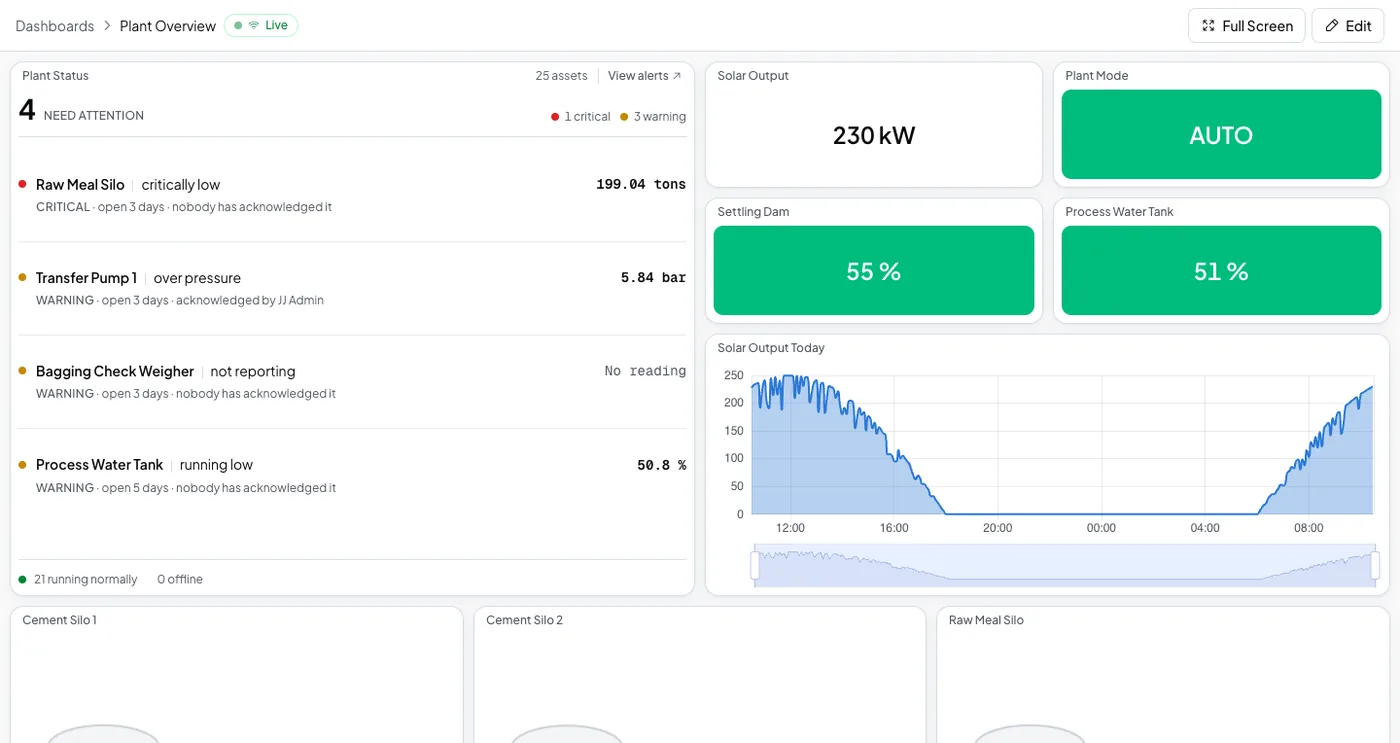
Keep the SCADA. Add the phone.
Logable adds the dashboard, the alerts and the phone on top of the control room you already run.
The alerts a control room cannot send
Four rules cover what goes wrong on a cement line between shifts.
- Running hot
Tells you when the motor’s temperature passes 90 °C, well before insulation damage.
- Belt stopped
Tells you when the belt stops moving. Only add this to a belt that is meant to run continuously. It will also fire on planned stops.
- Running low on stock
Tells you when this silo drops to a fifth of its capacity, so you can book a delivery before it runs out.
- Not reporting
Tells you when this device stops sending data, and again when it comes back.
The control room is not always staffed.
Line 2's drive motor reaches 92.4 °C at 02:14. Nobody is at the SCADA screen, so Logable sends the reading by phone to whoever is on shift.
- The reading, not just a pingThe push carries the device and the value, so you know what to do before you call anyone.
- One alert, then the next personIf nobody acknowledges, the next name on the list is told.
- Still read onlyAcknowledging an alert changes nothing on the PLC. The SCADA keeps control.
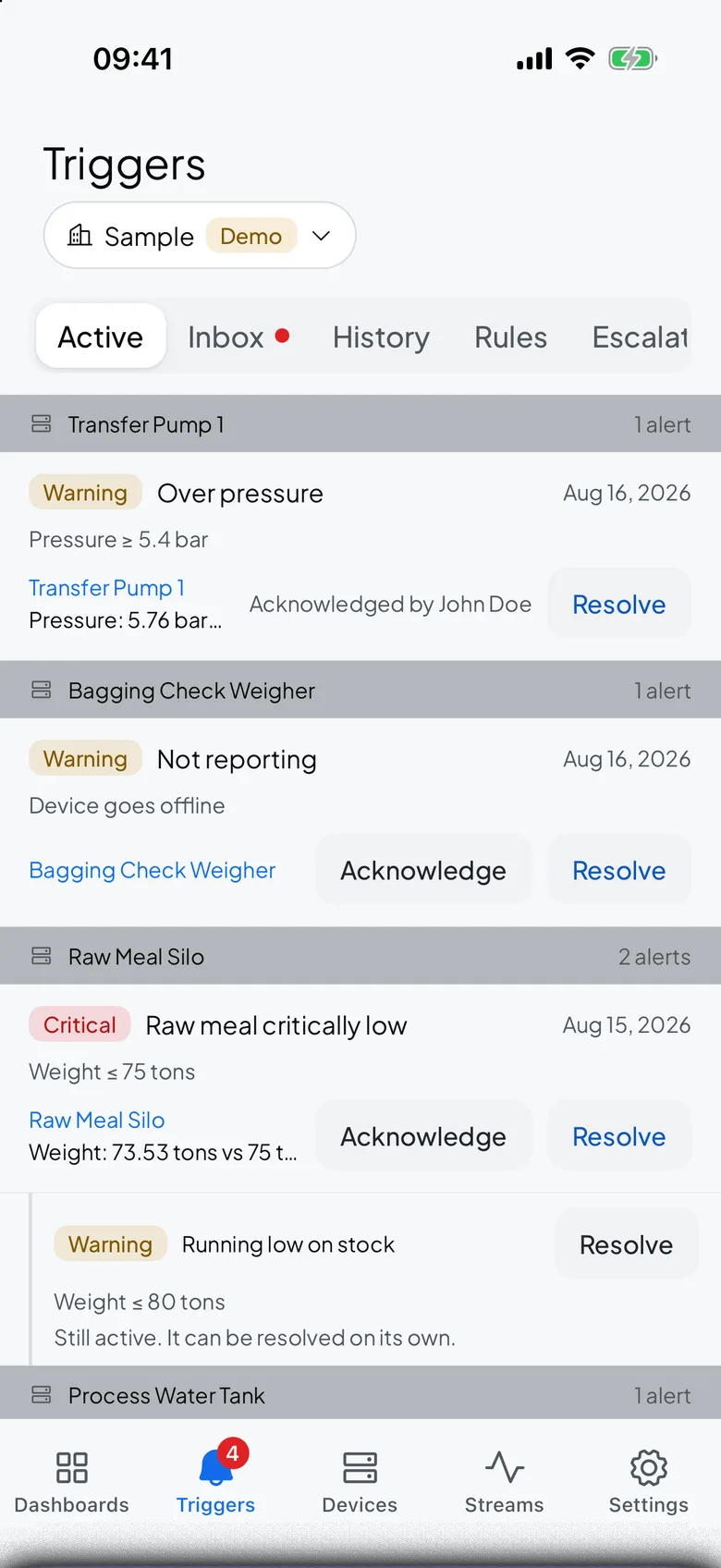
What goes wrong, and what changes
Three things a control room learns about late, and the rule that gets there first.
| What happens | What you see today | What Logable does |
|---|---|---|
| A drive heats up through the night shift. | Nobody is at the SCADA screen until 06:00. | A phone alert carries the 92 °C reading.Running hot |
| A belt stops on a transfer point. | The next operator finds a backed-up chute. | The stopped-belt alert fires the moment speed falls to zero.Belt stopped |
| The gateway loses its link. | The SCADA still looks fine, so nobody notices the cloud went quiet. | The not-reporting alert says which device went silent, and again when it returns.Not reporting |
SCADA and Logable, side by side
A side-by-side look at what stays the same and what changes when you add Logable next to your SCADA.
| Traditional SCADA | Logable | |
|---|---|---|
| Deployment | On-premises servers | Cloud-hosted, no servers to manage |
| Access | Local network only (or VPN) | Any browser or mobile device, anywhere |
| Setup Time | Weeks to months | Minutes to hours |
| Maintenance | IT team manages servers, backups, updates | Fully managed: automatic updates and backups |
| Mobile Access | Limited or third-party add-on | Built-in mobile app and responsive dashboards |
| Multi-Site | Separate server per site (typically) | Multiple organizations from one account |
| Alerts | Basic threshold alarms | Threshold, status change, rate-of-change, data received |
| Collaboration | Limited user management | Role-based access with owner, admin, member, and viewer roles |
| Cost Model | Large upfront license + hardware | Subscription-based, scales with usage |
Nothing changes on site
Your PLCs, drives and wiring stay exactly as they are. Add a gateway, and Logable adds the dashboard, the alerts and the phone on top.
What it costs
Sized by how many devices the gateway reads, not by how big the plant is.
The trial runs 14 days with 5 devices and Growth features, and asks for no card. Industry plans are quoted per site.
The gateway is bought once from your supplier and is not a Logable cost. Your SCADA licence is unchanged.
Frequently asked questions
What teams ask before they connect the first device.
Logable is a cloud-native monitoring platform, not a traditional SCADA system. It excels at data visualization, alerting, remote access, and collaboration. However, it does not provide real-time control capabilities (writing back to PLCs). If you need both monitoring and control, Logable can complement your existing SCADA by adding cloud visibility on top. If you primarily need monitoring, dashboards, and alerts, Logable can replace the monitoring side entirely.
Absolutely. Many teams run Logable alongside their existing SCADA system. Your PLCs and field devices continue operating as they do today. An IoT gateway reads data from your equipment (via Modbus or other protocols) and sends it to Logable in parallel. This gives you cloud visibility and mobile access without changing your existing control infrastructure.
Logable is a monitoring platform: it reads and visualizes data but does not write commands back to your PLCs or field devices. If you need real-time control, keep your existing PLC programs and local control screens for that purpose. Logable adds the cloud monitoring, alerting, and remote visibility layer on top.
If the internet connection between your IoT gateway and Logable drops, the gateway typically buffers data locally and uploads it when connectivity is restored (depending on your gateway capabilities). On the Logable side, device status tracking shows real-time online/offline state with automatic heartbeat detection and a 5-minute timeout for offline detection.
There is no disruptive migration required. You keep your PLCs, field devices, and wiring exactly as they are. Add an IoT gateway to your network, configure it to read from your devices, and point it at Logable. You can start with a single device and expand over time. The gateway setup is the only on-site work, and nothing in your existing control system changes.
Yes. Each site keeps its own devices, dashboards and team, and you switch between them from one account, without a second login or a second app.
Also for PLCs, Modbus and remote sites
PLC Monitoring
Connect PLCs to cloud dashboards via gateways.
Learn moreModbus Monitoring
Bridge Modbus RTU and TCP devices to the cloud.
Learn moreRemote Monitoring
Sites without an operator on hand.
Learn moreRunning a plant like this? monitoring for manufacturing or read how to build a dashboard.
Add the gateway. Keep the SCADA.
Connect the first PLC alongside your SCADA today. The dashboard and the alerts are ready when it reports.